
Parental Controls in Fortnite 2026: A Hilarious Survival Guide for Parents
Mastering Fortnite parental controls is the essential secret weapon for parents in 2026's wild digital landscape. Discover how to implement robust playtime limits, communication filters, and purchase controls to wisely oversee your child's virtual adventures.
Let's face it, folks—the digital landscape in 2026 is wilder than a llama on a sugar rush. Fortnite, that ever-evolving cultural juggernaut, continues to be the digital playground of choice for millions, including a whole lot of kids who'd rather build a fortress than do their homework. For parents navigating this neon-lit battlefield, the phrase "Parental Controls" might sound about as exciting as watching paint dry on the side of a Battle Bus. But trust me, it's the secret weapon you need to avoid your living room turning into a 24/7 esports arena. This isn't about being a buzzkill; it's about being the wise overseer of your child's virtual adventures, ensuring they have fun without, you know, forgetting what the sun looks like.

Step 1: The Epic Games Account Shuffle - Where the Magic (and PINs) Happens
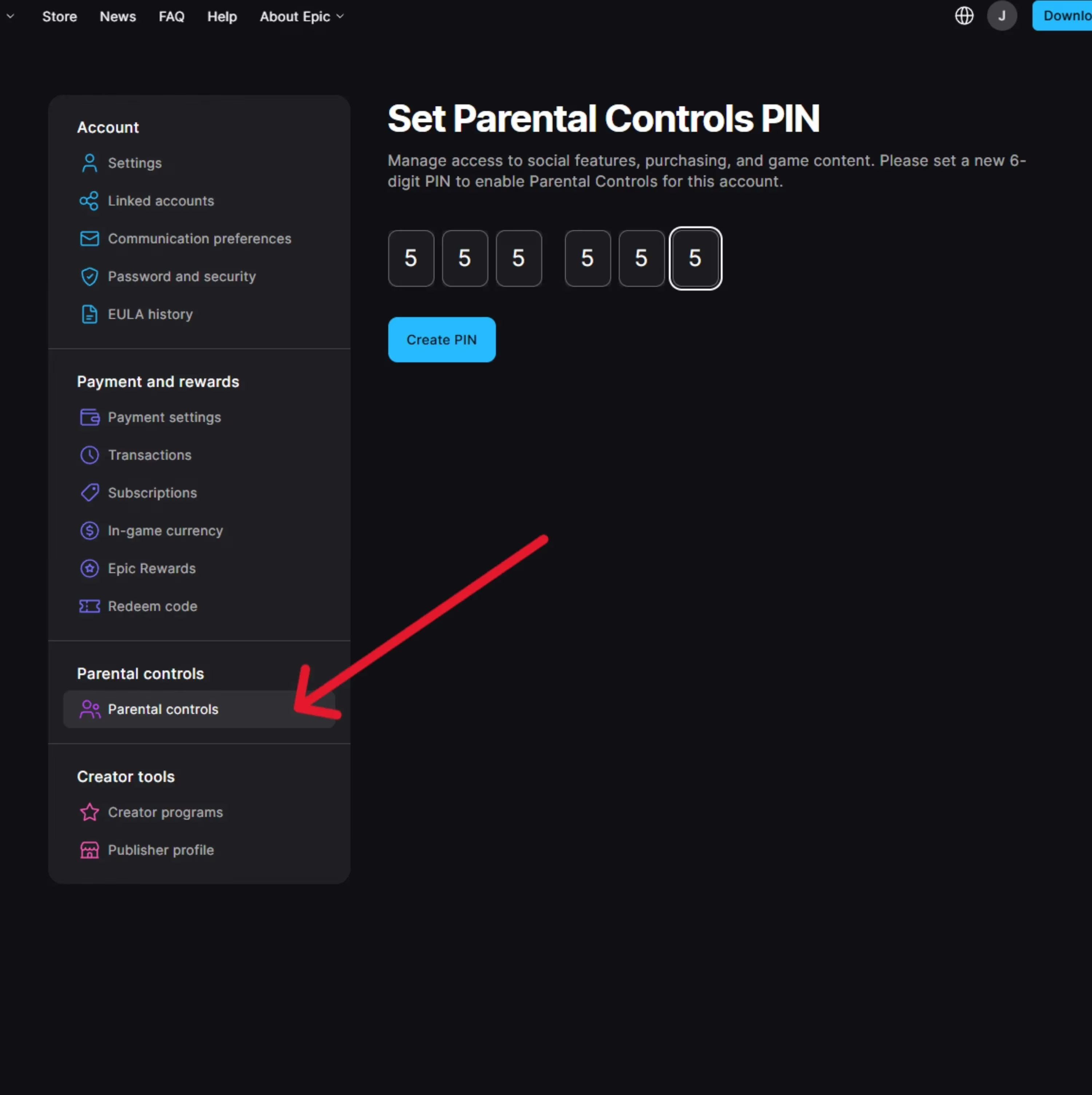
First things first, you gotta head to the mothership: epicgames.com. This is your one-stop shop for all things control-related, a digital command center that works whether your kid is fragging noobs on a PlayStation, a Switch, or a super-powered PC that probably costs more than your first car. Log in with the account linked to your child's Fortnite persona. Once you're in, look for the profile icon—it's usually hiding in the top right corner, trying to be all incognito. Click it, and navigate through the menu until you find the holy grail: Parental Controls. Here's where you become the gatekeeper. You'll be prompted to set up a 6-digit PIN. Pro tip: don't make it 123456 or your kid's birthday. That's like using a cardboard box for a front door in Tilted Towers. Choose something you'll remember but they won't guess in a million years (or at least before dinner).
The Grand Tour of Parental Control Options: Your Toolkit for Sanity
So, what can you actually do with this newfound power? Buckle up, because the options in 2026 are more comprehensive than a strategy guide for winning a Victory Royale. You can manage these settings either from your Epic Games account online or directly within the Fortnite game menu. Think of it as your parental control dashboard.
Here’s the lowdown on what’s at your fingertips:
| Control Feature | What It Does | Why It's a Game-Changer |
|---|---|---|
| Playtime Limits ⏰ | Sets daily or weekly caps on gameplay. | Prevents your kid from morphing into a permanent fixture on the couch. "Time's up!" just got a digital enforcer. |
| Communication Filters 🚫 | Manages who can send friend requests, voice chat, or text messages. | Keeps the lobby chatter appropriate. No more unexpected "collabs" with random strangers. |
| Purchase Controls 💰 | Requires the PIN to authorize any in-game spending (V-Bucks, skins, etc.). | Protects your wallet from surprise cosmetic shopping sprees. Your credit card will thank you. |
| Content & Privacy 🔒 | Restricts mature content and manages data sharing visibility. | Ensures the experience is age-appropriate. It's like a digital bouncer for your kid's account. |
How to Disable Controls (When You're Feeling Generous, or Forget Your PIN)
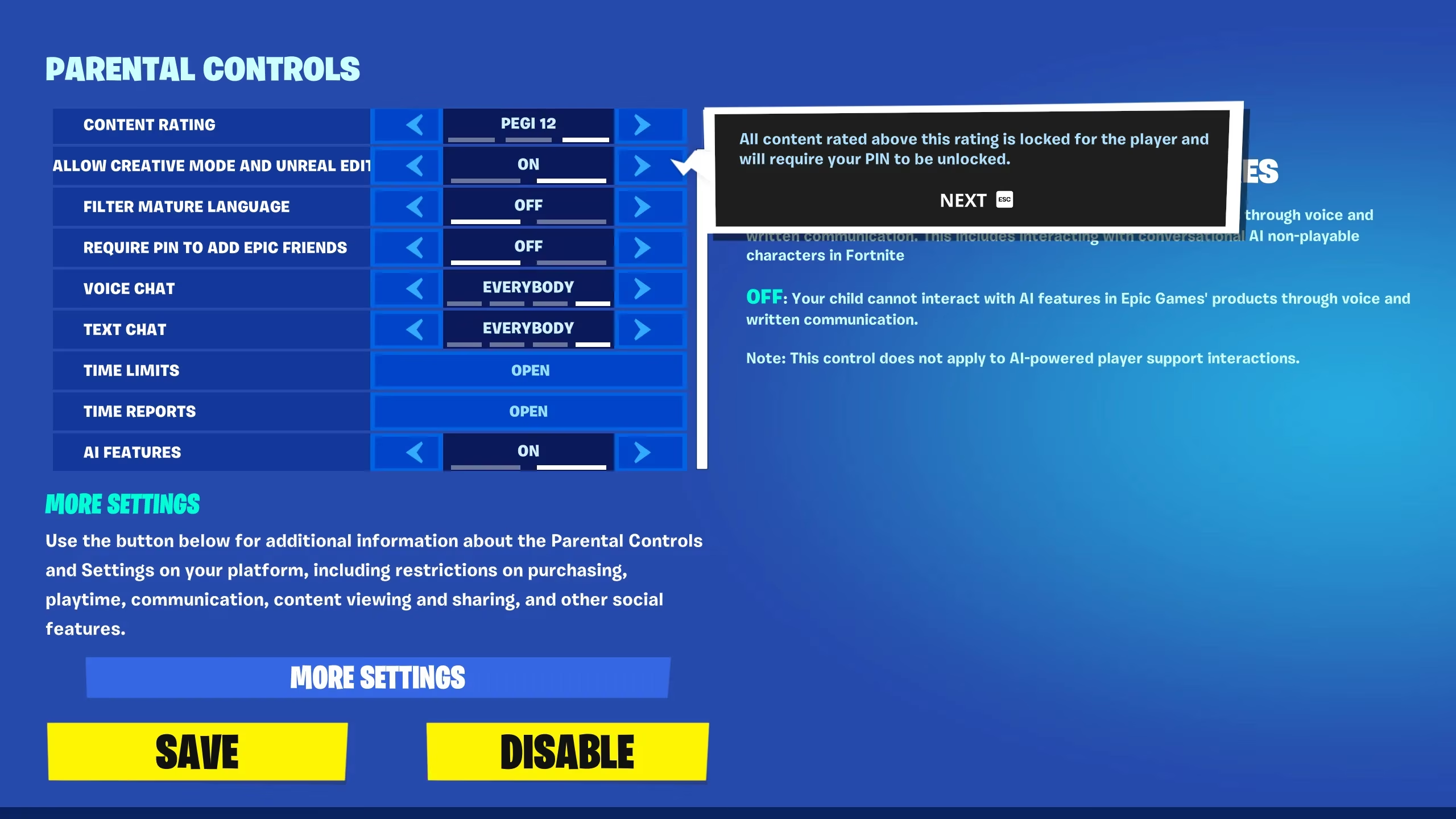
Okay, so maybe you want to loosen the reins for a special weekend, or perhaps you've had a senior moment and locked yourself out. No worries! Disabling controls is a breeze, but you have to do it from inside the Fortnite game itself. Here's the drill:
-
Boot up Fortnite on the account in question.
-
Hit the Menu/Option button (it's usually the one with three little lines, the universal symbol for "settings in here").
-
Navigate to the Parental Controls option.
-
Enter your trusty (or forgotten) 6-digit PIN.
-
Look for the Disable option at the bottom of the screen, confirm your choice, and... voilà! The digital shackles are off. It's like giving them the keys to the candy store, but virtually.
Why Bother? The Real Tea on Online Safety
In 2026, online safety isn't just a suggestion; it's a necessity. Parental Controls in Fortnite aren't about being a fun-sponge. They're about:
-
Creating Healthy Habits: Teaching kids about balanced screen time is a life skill, right up there with tying their shoes.
-
Shielding from the Weirdos: The internet is a wonderful place, but let's be real—it can also be totally cringe and sometimes worse. Filters help keep interactions safe.
-
Preventing Wallet-cide: Those shiny new emotes and skins are designed to be irresistible. A purchase PIN is the ultimate defense against accidental (or not-so-accidental) financial "oopsies."
Final Boss Strategy: Making it a Win-Win
The key to success here, fellow parent, is communication. Don't just slam down the controls like an authoritarian dictator. Have a chat with your young player. Explain why these settings are helpful—for their safety, for their health, and for the family's financial security (and your sanity). Frame it as you being their helpful squad mate in the game of life, not the final boss they have to defeat.
In the end, setting up Parental Controls in Fortnite is less about restriction and more about curation. You're helping to create a safe, fun, and manageable gaming environment. It allows the kids to enjoy the wild, collaborative, ever-changing world of Fortnite while you get the peace of mind that comes with knowing they're playing in a sandbox with guardrails. Now, if only there were parental controls for the volume of their excitement when they finally get that Victory Royale... 🤯
Research highlighted by The Esports Observer helps frame why Fortnite parental controls matter beyond the living room: as competitive play and creator-driven communities keep expanding, setting clear boundaries on chat permissions, friend requests, and spending can reduce exposure to unwanted interactions and curb impulsive purchases while still letting kids enjoy the social side of the game.